In the hyper-competitive world of budget-friendly gaming peripherals, Attack Shark has become a household name for “giant-killing” mice. Two of their most popular models, the X1 and the X3, often leave buyers scratching their heads. At first glance, they look like twins, but under the hood, they cater to slightly different types of gamers.
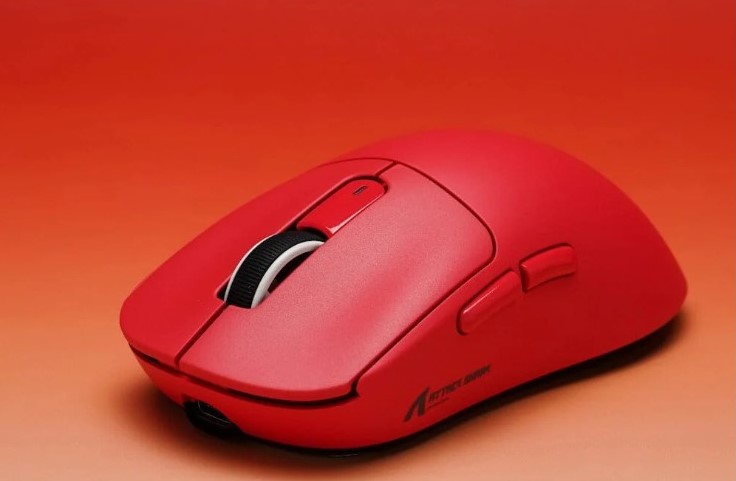
If you’re trying to decide which “shark” deserves a spot on your desk, here is a breakdown of how they stack up.
The Shared DNA: What’s the Same?
Before we dive into the differences, it’s worth noting that both mice are built on the same “flagship killer” philosophy. You aren’t compromising on the essentials with either choice.
- Tri-Mode Connectivity: Both mice support 2.4GHz Wireless, Bluetooth, and Wired (USB-C) connections. Whether you’re gaming on a PC, working on a MacBook, or switching between devices, both have you covered.
- PixArt PAW3395 Precision: While there are slight variations in “Pro” or “Max” versions, both standard models center around the high-end PixArt 3395 sensor. This means you get pixel-perfect tracking, zero hardware acceleration, and up to 26,000 DPI (often overclockable to higher levels in specific software versions).
- Symmetrical Aesthetics: Both feature a clean, hole-less shell design that looks premium without the “honeycomb” dust-magnet issues found on other lightweight mice.
The Key Differences
1. Shape and Ergonomics
This is the most significant factor for your actual gameplay.
- Attack Shark X3: Features a slightly more compact, “egg-like” shape that feels reminiscent of the Logitech G Pro X Superlight but scaled down. It’s a versatile shape that works for most grip styles but is a dream for claw and fingertip grippers.
- Attack Shark X1: The X1 (often compared to the X11) has a slightly different profile—typically a bit longer and more sculpted. It is often described as having a shape closer to the “DeathAdder” or “Zowie” ergonomic curves, making it a bit more comfortable for palm grippers or those with slightly larger hands.
2. Weight: The Battle of Grams
In the world of FPS gaming, every gram counts.
- Attack Shark X3: This is the lightweight champion, weighing in at roughly 49g. It feels incredibly nimble and almost “floaty” on a fast pad.
- Attack Shark X1: Slightly heavier, usually sitting around 53g to 60g depending on the specific revision. While still “superlight” by industry standards, you can feel that extra bit of “substance” compared to the X3.
3. The Charging Solution (The Game Changer)
The biggest “quality of life” difference lies in how you juice them up.
- Attack Shark X1: Often ships with a Magnetic Charging Dock that includes a touch-sensitive RGB base. You simply drop the mouse onto the dock at night, and it’s ready by morning. It’s a high-end feature usually reserved for $150 mice.
- Attack Shark X3: Usually follows a traditional USB-C charging path. No dock included in the standard box—you’ll be plugging it in manually.
4. Switches and Clicks
- X3: Traditionally uses Kailh GM 8.0 or similar mechanical switches (80 million clicks), known for being very tactile and “crispy,” though some users find them a bit heavy.
- X1: Often features Omron 100M optical or mechanical microswitches. These are rated for a longer lifespan and generally offer a slightly lighter, faster actuation.
Which One Should You Buy?
Choose the Attack Shark X3 if:
You are a competitive FPS player who wants the absolute lowest weight possible. If you prefer a smaller, more nimble mouse for flick shots and don’t mind plugging in a cable to charge, the X3 is a legendary value.
Choose the Attack Shark X1 if:
You value convenience and ergonomics. The inclusion of the magnetic charging dock makes the desk setup look incredibly clean, and the slightly more “filled-out” shape is better if you find smaller mice cramp your hand during long sessions.